Punctuation Checker
Paste your text into this punctuation checker to catch comma, quote, apostrophe, dash and spacing mistakes, each explained by its rule, checked on your own device.
Punctuation checker
Checked on your device — nothing is sent
Issues
A transparent rule-based checker: it catches mechanical punctuation errors and flags likely comma problems. It does not understand meaning, so some comma splices and nonessential clauses still need your own read.
Consistency report
Keyboard shortcuts
- Ctrl + Enter
- Check now
- Ctrl + Shift + Enter
- Fix all safe issues
- Ctrl + Z
- Undo
- Ctrl + Shift + Z
- Redo
- Alt + ↓ / ↑
- Next / previous issue
- Esc
- Close this window or the active highlight (your text stays)
How to use the punctuation checker
This punctuation checker reads your text in the browser, marks every mechanical punctuation problem it can prove, and tells you which rule each mark breaks. I built the workflow around the way I proofread on paper: one pass for the marks, then a slow read for meaning.
- Paste or type your text. An essay, an email, product copy, a chapter. Paste arrives as plain text, so stray formatting from Word or Google Docs cannot hide an error. The check starts by itself a moment after you stop typing, or at once with the Check text button, and there is no length limit. Try a sample loads a short messy text in the language you picked (in English it is the worked example below).
- Pick the language and the mode. There are nine language variants: English (US, UK and AU), Deutsch, Français, Français (Canada), Español, Italiano and Português. English (US) and English (UK) differ on quotes and dashes; French, Spanish and German have their own typography. Light mode looks only at spacing, doubled marks and brackets; Standard adds commas, apostrophes, dashes, quotes and language rules; Strict also wants number ranges, single exclamation marks and a final mark on every paragraph, and in English it enforces your Oxford comma choice.
- Read the rule card. Each flag names the rule and its ID, explains it in one line, shows your text before → after and a wrong → right example, and ends with a Read the rule link to the matching guide or section. The text map under the editor shows where the flags sit, the chips filter them by category, and Alt+↓ and Alt+↑ jump from issue to issue.
- Apply or ignore. Fix one issue at a time with Apply, or use Fix all safe issues. Anything that needs judgement, such as an unmatched bracket, stays in the list for you, and the counter says so (1 needs your decision). Ignore hides one flag; Ignore this rule switches a rule off and is remembered on your device. Esc never wipes your text, and Clear can be undone.
- Take the clean text with you. Copy it, download it as a .txt file, or print the list of issues for a student or a colleague.
What it checks
These are the errors I see on almost every page I mark up. The checker finds each of them by a fixed rule, not by guessing.
| Rule | Wrong | Right |
|---|---|---|
| Space before a mark | Hello , world. | Hello, world. |
| Missing space after a mark | I agree,but not today. | I agree, but not today. |
| Doubled marks | Wait,, what.. | Wait, what. |
| Comma after an introductory word | Therefore the plan failed. | Therefore, the plan failed. |
| Comma splice with however | I wanted to go, however it rained. | I wanted to go; however, it rained. |
| its / it's | changed it's own policy | changed its own policy |
| Possessive pronouns | Is this book your's? | Is this book yours? |
| Decades | the 1990's | the 1990s |
| Spaced hyphen as a dash | The test - which I hated - was long. | The test—which I hated—was long. |
| Period outside quotes (US) | He called it "fine". | He called it "fine." |
| Brackets and quotes | (see page 4 | flagged for you to close |
It leaves alone what only looks like an error: decimals like 3.14, thousands like 1,000, times like 10:30, web addresses, e-mail addresses, file names and code in backticks. A checker that flags those trains you to ignore it, and then you miss the real problem. In Strict mode a paragraph with no final mark is flagged but never fixed automatically, because only you know whether a heading is meant to end bare. The word and sentence count under the editor does not treat Dr., Mr., Mrs., Ms., Prof., St., vs., e.g., i.e., p.m. and similar abbreviations as sentence ends.
-- into a real dash and ... into a single ellipsis character.A worked example: one messy paragraph
Here is the kind of paragraph I get from a hurried email, checked in English (US), Standard mode:
The checker raises seven flags: a missing comma after Therefore, a missing space after Friday., two spaced hyphens used as dashes, a space before the comma after attached, the comma splice before however, and your's. After Fix all:
In English (UK) the dashes become spaced en dashes instead: The agenda – budget, hiring and travel – is attached, …. The consistency report shows the Oxford comma used 0 times and omitted once, so the list is consistent as it stands.
Now the part no rule can do. is attached, please read it before then is still a comma splice: two complete sentences joined by a bare comma. The checker cannot prove that, because please can start many legitimate phrases. I fix it by hand: is attached. Please read it before then. That is the honest division of labour: the tool clears the mechanical noise so your own read can catch the rest.
A second short case, quotes: She said "maybe", then left. becomes She said "maybe," then left. in US English, where commas and periods always go inside the closing quote. In UK English the original is correct and nothing is flagged.
Commas in five minutes
Four rules fix most comma problems I see. All four are set out in the Purdue OWL extended rules for commas.
- Two full sentences need a conjunction. A comma joins two independent clauses only with and, but, for, or, nor, so, yet (FANBOYS). A comma alone is a comma splice; use a period, a semicolon, or add the conjunction. I fix the splice first, because it is the one readers trip on.
- Introductory elements take a comma. While I was eating, the cat scratched at the door. Well, perhaps he meant no harm.
- Series of three or more. eggs, milk, and bread with the Oxford comma, or eggs, milk and bread without. I keep the Oxford comma in anything with lists of names, because it stops two people from reading as one. Either way, choose once and stick to it.
- Nonessential parts get a pair of commas. The plan, however, failed. My brother, who lives in Leeds, called.
Where commas do not go: between the subject and its verb, between the two verbs of one subject (She opened the file and deleted the draft), and usually before a dependent clause that follows the main clause (The cat scratched at the door while I was eating). The full set, with the four ways to repair a splice, is in the comma rules guide.
Quotes and apostrophes
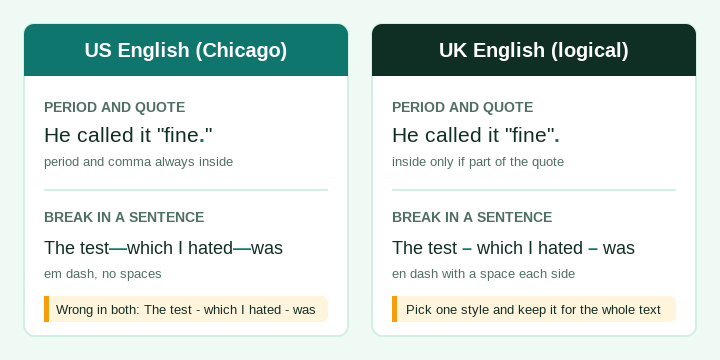
American style, as the Chicago Manual of Style, chapter 6 describes it, puts periods and commas inside closing quotation marks, every time. British style places them by logic: inside only if they belong to the quoted words. Question marks and exclamation marks follow logic in both. That is why the US/UK switch matters: the same sentence can be right in London and wrong in New York.
Apostrophes, per the Purdue OWL apostrophe rules:
- its is possessive, it's means it is or it has. If you can't expand it, drop the apostrophe.
- Possessive pronouns never take one: yours, ours, theirs, hers, its.
- Decades take none: the 1960s. Lowercase letters do: mind your p's and q's.
- Singular possessive adds 's even after s: James's hat; a plural ending in s adds only the apostrophe: two cats' toys.
Dashes and the semicolon, in short
Three marks, three jobs. The hyphen joins words (a well-known author). The en dash marks a range (pages 10–20). The em dash marks a break in the sentence. Chicago puts no spaces around any of them (Chicago Q&A on hyphens and dashes); British publishers usually prefer a spaced en dash for the break. A hyphen with a space on each side is wrong in both, and it is the most common dash error in emails. Strict mode also turns number ranges into en dashes; Standard leaves them alone, because phone numbers and product codes look exactly the same. For a break the checker suggests the unspaced em dash in US English and the spaced en dash in UK and AU English. The dash guide shows how to type each one on a Mac, on Windows and on a phone.
A semicolon joins two closely related full sentences, and it is the clean fix for a however splice: I wanted to go; however, it rained. A colon announces what the first clause promises: a list, an explanation, a quotation. The semicolon vs colon guide covers lists with internal commas and capitals after a colon.
French, Spanish and German typography
Most punctuation checkers stop at English. Writers in other languages make different mistakes, so the checker uses different rules for them:
| Language | Rule | Wrong → right |
|---|---|---|
| French (France) | Non-breaking space before ; : ! ? and inside « » (a narrow one before ; ! ?) | Vous venez? → Vous venez ? |
| French (Canada) | Space only before the colon | la liste: pain → la liste : pain |
| Spanish | Opening ¿ and ¡ are required | Vienes mañana? → ¿Vienes mañana? |
| German | Comma before dass, weil, obwohl; German quotes | Ich glaube dass → Ich glaube, dass |
Sources: French spacing before double punctuation, the RAE rules on punctuation signs and the Duden sample on commas and punctuation. Two judgement calls stay with you. In Spanish the opening sign goes where the question actually starts (Si vienes, ¿me avisas?), so when the checker inserts it at the sentence start, move it if the question begins mid-sentence. In German, with so dass or ohne dass the comma goes before the whole group, and the checker stays silent when the word before is so, ohne, als, statt, anstatt, außer, und, oder, aber, sondern, nur or bis. For Italian and Portuguese it applies the universal rules (spacing, doubled marks, brackets) and sets typographic quotes through Smart typography, without grammar guesses.
How the punctuation checker works and how it is checked
This is a transparent rule-based checker, not AI. Each rule is a precise pattern with a fixed message, a wrong → right example and, where it is safe, an automatic fix. It catches mechanical punctuation errors reliably and flags likely comma problems. It does not understand meaning, so some comma splices and nonessential clauses need a human read: My sister, who lives in Leeds, called and My sister who lives in Leeds called are both correct, and only you know whether you have one sister or two. Never trust any tool, this one included, that promises to catch every error.
Before any change goes live, the rules run against a set of control sentences with known answers, including traps that must not be flagged. After Fix all, the corrected text is checked again and must come back clean.
| Input | Expected result |
|---|---|
Hello , world. | Hello, world. (1 flag) |
Therefore the plan failed. | Therefore, the plan failed. (1 flag) |
I wanted to go, however it rained. | I wanted to go; however, it rained. (1 flag) |
The test - which I hated - was long. | US The test—which I hated—was long.; UK The test – which I hated – was long. (2 flags) |
Version 3.14 costs 1,000 dollars at 10:30, see example.com. | unchanged (0 flags) |
However hard you try, it fails. The plan, however, failed. | unchanged (0 flags) |
Wait,, what.. | Wait, what. (2 flags) |
He called it "fine". | US He called it "fine." (1 flag); UK unchanged (0 flags) |
Pages 10-20 are missing. | Standard unchanged (0 flags); Strict Pages 10–20 are missing. (1 flag) |
Bonjour! Vous venez? Voici la liste: pain, lait. Il a dit «oui». | French: Bonjour ! Vous venez ? Voici la liste : pain, lait. Il a dit « oui ». with the non-breaking spaces (5 flags) |
Vienes mañana? Sí. Qué bien! ¿Seguro? | Spanish: ¿Vienes mañana? Sí. ¡Qué bien! ¿Seguro? (2 flags) |
Ich glaube dass es regnet, so dass wir bleiben. Er sagt "nein". | German: Ich glaube, dass es regnet, so dass wir bleiben. Er sagt „nein“. (2 flags) |
We need eggs, milk, and bread. Bring forks, knives and spoons. Call Ann, Bo, and Cy. | Oxford comma used 2, omitted 1; Make consistent gives forks, knives, and spoons |
Hello | one flag exactly on the space and comma, at offset 11; Apply gives world, ok on line 2 |
Dr. Smith met Mr. Jones at 5 p.m. today. | 1 sentence in the counter |
Your text stays on your device
The whole engine runs in your browser. Nothing you type is sent anywhere: no server check, no account, no word limit, and the checker makes no network request at all while it works, which you can confirm in your browser's network tab. A text of 50 000 characters is checked in well under a second. Once the page has loaded, the checker keeps working offline. Only your settings (language, mode, Oxford choice, rules you switched off) are remembered on your device; the text itself is kept only if you choose to keep a draft. That matters when the text is a contract draft, a medical letter or an unpublished chapter.
Guides
 Comma rules with examples (and how to fix a comma splice)The comma rules that matter most, with wrong-to-right examples and four ways to fix a comma splice.8-minute read
 Semicolon vs colon: when to use eachA semicolon joins, a colon announces. The quick test, the correct uses and the mistakes to fix.6-minute read
 Em dash vs en dash vs hyphenHyphen, en dash, em dash: what each does, US vs UK spacing, and how to type them.6-minute read
FAQ
How do I check my punctuation for free?
Paste your text into the punctuation checker above, choose the language and mode, and read the flags. It is free, needs no account and has no word limit, because everything runs in your browser.
What is a comma splice and how do I fix it?
A comma splice joins two complete sentences with only a comma: "I wanted to go, however it rained." Fix it with a period, a semicolon ("I wanted to go; however, it rained.") or a conjunction such as and, but or so.
Does the period go inside or outside quotation marks?
In American English the period and the comma always go inside the closing quote. In British English they go inside only when they belong to the quoted words; choose US or UK in the checker and it follows that convention.
Should I use the Oxford comma?
Either choice is correct; mixing them in one text is not. I keep it in lists of names because it prevents misreading, and the consistency report shows if you have used both styles.
Do I need a comma after "however" at the start of a sentence?
Yes, when it means "nevertheless": "However, the plan failed." No, when it means "in whatever way": "However hard you try, it fails." The checker flags only the first kind.
Is my text stored when I use this punctuation checker?
No. The text is checked in your browser and never leaves your device; only your settings are remembered, and a draft is kept only if you ask for it.
Updated · About this site